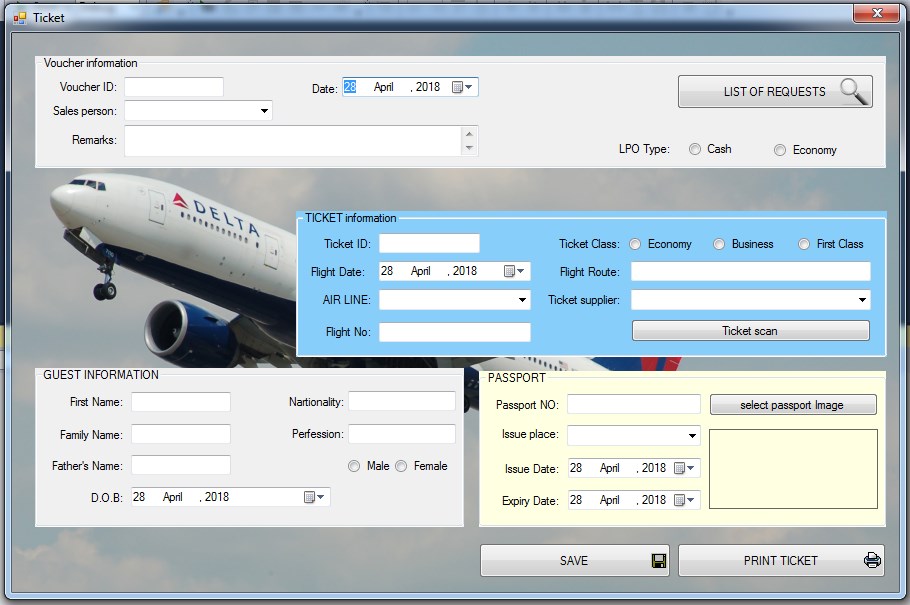
For any travel agency, it is very important to have a list of all passengers in good format.
In travel agency section of iGreen software, you can manage list of all passengers with the most wanted reports .
For every passenger, you can add Passports as you want but each passport is unique for one passenger only .
Information of passengers
Name
Family name
Date of birth
Father name
Nationality
Address
Country of resident
City of resident
Passport information
When you add a passenger, iGreen will generate a new ID for him/her . So in visa entry, tickets voucher you can load passenger information by calling ID
In time of add information of new passport, it is easy to add scanned image of it . This image will be shown any time in iGreen to help you control real information of passengers and compare it if need .
Unique name of passengers
iGreen software will check repeated name of passengers and you warning you about it . A repeated passenger has same name , last name, father name , D.O.B in same country.
It is very very weak to find two human in one country with same name, l name , father name , D.O.B
So you use it to protect you from repeated passengers names .
In version 2.4.0.0 we are working on Air agency section of iGreen software to make it more user friendly for travel agencies in Dubai and other cities of United Arab Emirates.
Forms of travel agency in iGreen
Passports
Passengers
Visa
Tickets
Hotels
Tours
In Passports form, you can add scan of passports also easily and then you can control passport of passengers in visa entry, tickets , and hotel reservations.
Load passengers and their passport is very easy in vouchers entry .
FTA audit file is very important in any accounting software to send tax value to UAE tax portal automatically. If you have a business in Dubai, Abu Dhabi, Sharjah, Ras Al Khaimah and Al Ain, so that you can send your business’s tax declare by iGreen accounting software to online tax portal of United Arab Emirates very easy.
We are working to active FTA audit file export in excel format ( XLX ) in iGreen accounting software very soon.
For any shops or stores in Dubai or UAE, to enter invoices, a list of items is a must. items are main body of sales invoices and a clear list of goods and items could help a shiny reports of sales.
How to add items of products and goods in iGreen
To add items in iGreen accounting, please click on button:
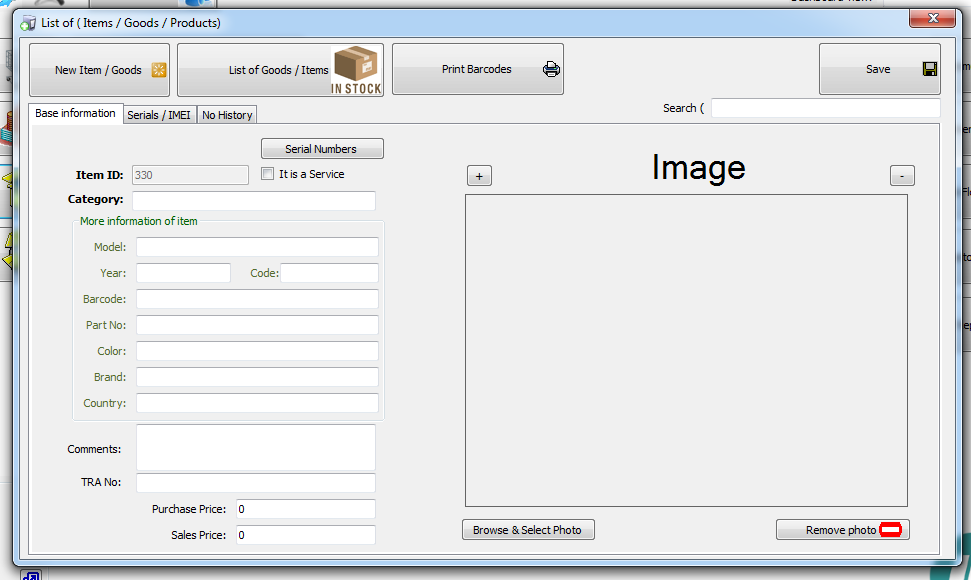
then you will see a items form as below:
by click on New item button:
a new code will be generated and it will be waiting for you to enter information of items (Product of goods)
Information of item (Goods or products)
As you see in below photo, You can enter information of goods or products as below:
Category (must)
Model (must)
Brand (must)
Year (Optional)
Barcode (Optional)
Part No (Optional)
Color (Optional)
Country (Optional)
Comments (Optional)
TRA No (Optional)
Note: item list in Invoice has a smart search like Google search and you can search for item like you search in Google
iGreen accounting is 100% compliant with UAE VAT rules. It prints your TRN number (Your Tax Number in United Arab Emirates) for economic department of Dubai. VAT in UAE is 5% of sales gross amount. In setting form inside iGreen software, you should enter and save VAT number, and then it appears in prints of invoices automatically.
in iGreen accounting you can print report of sales VAT very very easy. this report is very clear and easy to understand. This report will be calculated and prepared regard to TAX percent that you adjusted in setting as example of below image:
How to access VAT report
in home screen of iGreen accounting, in right corner you will see a button like:
Please click on it and then form of VAT report will be shown, as below:
As you see in this report, all sales invoices has been shown and in the last column Tax amount of sales amount has been calculated regard to VAT percent of setting.
You can also select date ranges of invoices from date to date by selecting date from upper date combo button in top of form.
for example we selected from 01 OCT to 24 OCT as below:
One of software that has been used in Dubai by many companies and shops is iGreen accounting. This software has been designed by a long experiences programmers. Priority focus of designing algorithm of this accounting software is on Dubai markets. so that we will update it every time with any new changes in economics rules and market conditions.
We pay attention daily to special requests of accountants and data operators in Dubai and will update iGreen with these modules to make it more and more user friendly. so, any suggestion from users of iGreen is like a golden idea and we will be happy to listen your voices.
every business or shops maybe has its special request and accounts formula and we respect to our customers and users of iGreen with good attitude !.
How trust iGreen accounting as the best in Dubai
We don’t receive any payment at the delivery time of software, so you can start working with this accounting -software that used in Dubai and after one month and after you are sure that this accounting software is suitable for your shop, then we will request for 50% payment and after 2 months you can pay remained balance of payment.
Managing passengers in iGreen’s air travel agency software is a breeze. Simply navigate to the travel agency section and select the appropriate form for your needs, whether it be Visa, Tickets, or Hotel. From there, you can easily manage your passengers and their information. Don’t waste any more time with complicated software – switch to iGreen today and streamline your travel agency operations.
Please click on [PASSENGERS] button .
so that you will see Passenger management form as below:
HOW TO ADD PASSENGER
we must first click on the designated button labeled “New passenger”. This will prompt the system to open a new window where we can input the necessary information. The required information includes the passenger’s name, last name, date of birth, name of father, and passport information. It is important to ensure that all information is accurate and up-to-date to avoid any issues during the travel process. Once all information has been entered, we can save the new passenger’s profile and they will be added to the system. This process is crucial for maintaining an accurate and efficient passenger database, which is essential for the smooth operation of any travel system.
At the end please click on [SAVE] to add passenger to list
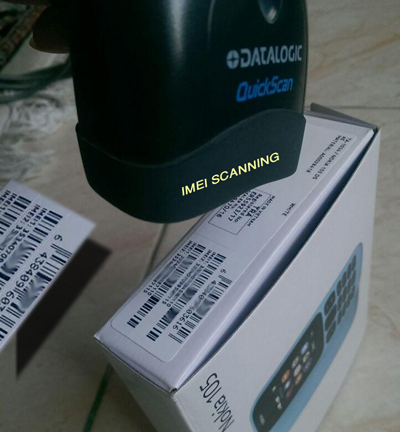
Inventory management for small businesses and small stores is a weekly task and it should be done to protect items from losing. Every week, stuffs will count items and goods in stores and warehouses to check mark it with prints on paper or by software.
Inventory Management Software
An inventory software will add and reduce quantity or amount of items after purchase or sales vouchers. for example when a sales of 2 pairs shoes with barcode 789654 has been done, then inventory software will reduce 2 pairs of shoes with same barcode from warehouse inventory automatically.
Inventory management by iGreen accounting
Wen you enter sales invoice in iGreen software, it will reduce items of invoice from warehouse inventory and when you enter a purchase voucher, it will add items of purchase to warehouse inventory.
Example of Inventory Report in iGreen
As you see in this report from a Tyre shop in Dubai that uses iGreen accounting for their accounts department, It reduced 2 pcs from inventory because of Sales voucher ID 32 and balance of inventory is 2
We are ready to design any software that you need for your business, company and shop in United Arab Emirates and Dubai.
Types of software
Actually designing and programming any type of software and application is possible for us. So that, you only decide and we will create it with the best quality
We have sample designed software as:
Accounting software
Travel agency
Mobile shop management
Appointment software
CRM portal
Data server
There is no limitation for us from small data processing to huge amount of data per second, it is easy for us.
We use the most used power version of data server 2018 as MS SQL and Oracle database centers.
Data server by iGreen
Platform of software
Running platform could be in cloud server, your local server or desktop computer located in your company.
Support and maintenance
Aftermarket and support of software could be includes monthly updates , teaching operators, maintenance of server and also design new requested forms. All of these are possible for us and it could signed over contract.
Operating systems
Our designed software and applications could be run in operating systems as below :
Windows
Macintosh
IOS
Android
How to order
First of all , please send us a message by whatsapp or email and send us a copy of current forms and sample vouchers on papers and hand written vouchers.
We will consider it and then we call back to you for professional negotiations and analizing flow charts of designing structure and programming. So after 50% down payment of contract, We will start of work
Delivery time
It is related to structure of software and application that you want but usually it takes from one month to more than four months
In all travel agencies billing operation after ticket, visa and tour packages is the most step and to allow business management information about profit
and loss of sales per month. billing operations and vouchers in travel agency could be categorized as:
Gross sales of tickets
Gross sales of Visa issue
Gross sales of Tours
Offices expenses
Payroll
Gross means sales amount with charges of it. so that to to have net sales amount, all charges amounts should be deducted from gross sales amount.
Office expenses are like: rent, telephone lines, internet charges, food and drinks, repairs, building monthly charges, fuels, …