In all travel agencies billing operation after ticket, visa and tour packages is the most step and to allow business management information about profit
and loss of sales per month. billing operations and vouchers in travel agency could be categorized as:
Gross sales of tickets
Gross sales of Visa issue
Gross sales of Tours
Offices expenses
Payroll
Gross means sales amount with charges of it. so that to to have net sales amount, all charges amounts should be deducted from gross sales amount.
Office expenses are like: rent, telephone lines, internet charges, food and drinks, repairs, building monthly charges, fuels, …
By use unique pricing system of items ( UPSI ) in iGreen software for your business in United Arab Emirates, every item will be traced by purchase price and sales price exclusively and it will cause to calculate sales profit without any mistake or margin, better than FIFO, LIFO and average profit systems.
In any shop, sales invoices will show profits of that shop. so that, more invoices, mean more profits for the shop.
To have accurate profit report of invoices, iGreen includes a price label system.
What are price labels in iGreen
iGreen could mark all items one by one by purchase price and sales price. so that any item has a unique bar-code label. at sales time, you can read purchase price of that item and decide about sales price without confusing with other purchase prices. it means if you buy same model of an item with different prices, iGreen will mark all items with its purchase prices one by one.
How to mark purchased item with price label
When you enter purchase vouchers, beside SAVE button, there is an option as “Price label” as it shown in below photo:
Price bar-code option purchase
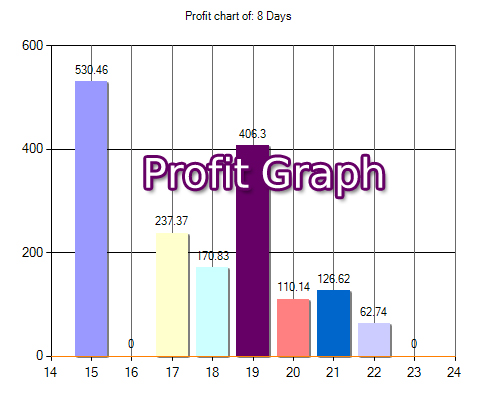
With put price barcodes on items in shops, then you can issue sales invoices very easy and profit report of your items are very accurate. As you see in below photo, we selected invoices of last week and it wil show us in a last and in a Graph as profit report.
Profit Report of Invoices
In graph report you can easily recognize the day with the most profits
Profit of sales is one the most wanted reports for business owners and specially for shop owners. when you issue an invoice or bill, it is very nice to be able to see the profit instantly.
iGreen accounting has an advanced module that could calculate sales profit (also sales loss) instantly after posted invoice. actually iGreen will calculate all beginning inventory and current inventory of a product and then will calculate profit regard to invoices of same product
Example of income statement in iGreen
You have a shop of home appliances in Dubai, U.A.E and you have a purchase and sales as below
You purchased 10 pcs vacuum cleaner for USD 210
You sold one pcs for USD310
then you got USD100 profit for this sales. now let’s see how iGreen accounting software show profit sales of this item
Report of Sales Profit
As you see, this easy to understand report will help you to see profit of sales without need to know accounting and it is very suitable for shops owner that they wouldn’t like to hire an accountant and want to manage their shop their-selves in Dubai
Online accounting software are the best solution for managers of businesses in Dubai to have freedom from their accounts departments with access to it any where and any time. Online accounting via online portal needs a server with 99% up-time and inside a cloud accounting needs a cloud server with a acceptable speed.
Both of these servers have big charges annually but you have another option with minimum charges and the highest speed. it is local software with online data server.
iGreen accounting has options to let you select local server or a free online server to locate accounting data. therefore, you only need to pay only for a data-server as name SQL server annually but you have an online accounting software for your small business in Dubai or any city in GCC countries for free without payment for a dedicated server or cloud server.
Charges of online accounting
Online portal on dedicated server : 700 AED (monthly) x 12 Cloud server : 500 AED (monthly) x 12 SQL Server : (One user) : 50 AED x 12
Note: when you use one user SQL server, then iGreen can create unlimited company on data server therefore before buy a data-server , please check how many database you can create on your server per users.
Data server of iGreen accounting
If you have old version of iGreen accounting, or you don’t have iGreen accounting software, Please download it
Install iGreen accounting
in Upper menu, please click on [setting] and then click on [Dataserver]
Access to menu of data server setup
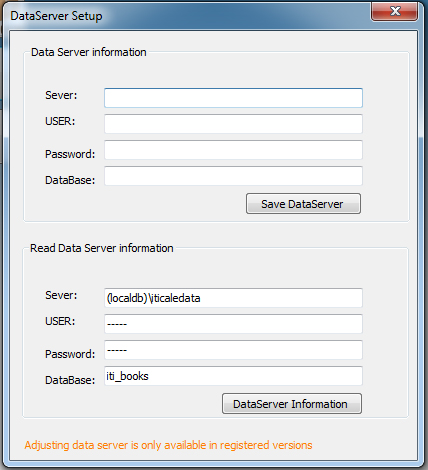
Then you will see a form as below
As you see, in up section, you should enter information of your SQL server as
IP or domain of server
Data server adjustment in iGreen
USER ID
Password
Name of Database [optional]
When you click on [save Dataserver] then iGreen Accounting software will create a database on your server and you can start your accounting as online accounting
Note: anywhere and on any PC, you can run iGreen accounting and when you enter these information, so that you will see all posted invoices and vouchers of your small business or medium size business and it means you can access your accounting online and for free without need to pay for a portal annually.